One-tap attendance
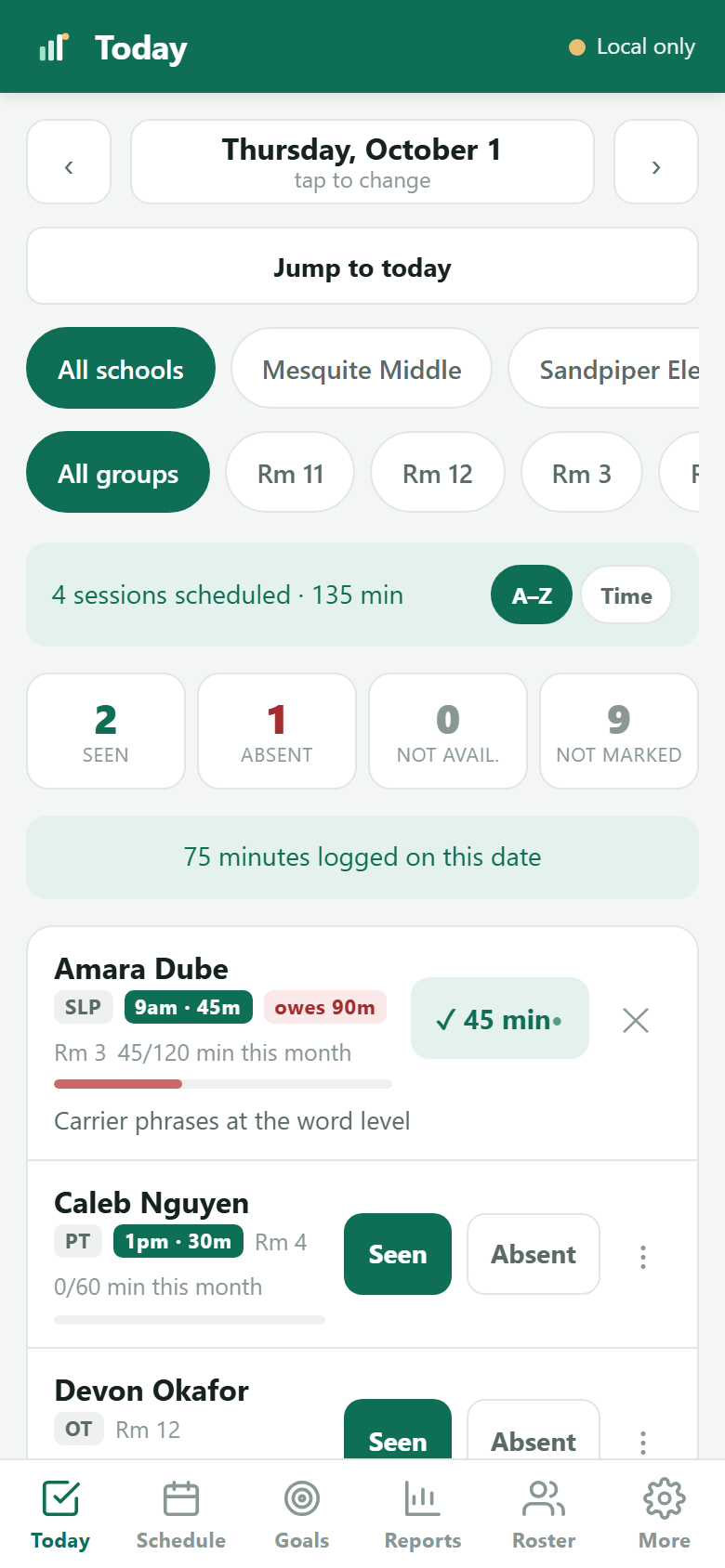
Mark each student Seen, Absent or Not available with a quick reason like testing or an assembly. Seen logs their scheduled session length automatically.
MinutesMet tracks service minutes and builds a schedule that bends when your week does — so you always know who is owed what. Built by a school-based OT for anyone tracking service minutes in a school.
30 days of everything free, then free for up to 10 students. No credit card to start.
Founding offer: subscribe while founding pricing is open and your price stays the same for as long as you stay subscribed.
Sound familiar?
Adding up sessions in a spreadsheet at the end of the month is how students fall behind without anyone noticing.
Data taken on a sticky note in March is gone by May. It should be attached to the session you took it in.
That answer depends on your district, and it is nearly impossible to hold in your head across a caseload of forty.
A 30-minute weekly slot and a 120-minute monthly IEP target don't always add up. You usually spot it once the month closes, with make-ups to find.
Features
Designed around the way related service providers actually work: a caseload, a schedule that changes every week, and IEP minutes that have to add up anyway.
Mark each student Seen, Absent or Not available with a quick reason like testing or an assembly. Seen logs their scheduled session length automatically.
Set each student's target per week, month or quarter, direct or consult. The minutes check counts the real school weeks in each window and flags anyone your timetable leaves short.
See a student on the 1st and 3rd Monday, or the last Friday. Move one session without touching the rest. Mark a day off and the whole week adjusts. Works with A/B days and rotating cycles, and across more than one school.
Every district decides differently which missed sessions have to be made up. You set the rules once, and MinutesMet keeps the running total of what each student is owed — and shows you where in the week the time is.
A day, week or month calendar you can print and pin up. Plus one sheet per class, so every teacher knows exactly when you'll pull their students.
Bring in your roster from Excel, CSV or Word, then organize students by teacher, class or group. No typing forty names by hand.
Write the goal in your own words, say what you are measuring and what you are aiming for, then record a number as you go. The progress graph draws itself — and prints, for the quarterly report somebody is going to ask you for.
Daily, weekly and monthly reports showing minutes, dates seen and progress toward each target. Export to a spreadsheet in one tap.
See it working
Every image below is the real app. The students are invented — no real caseload appears anywhere on this site.
Your week, on one page
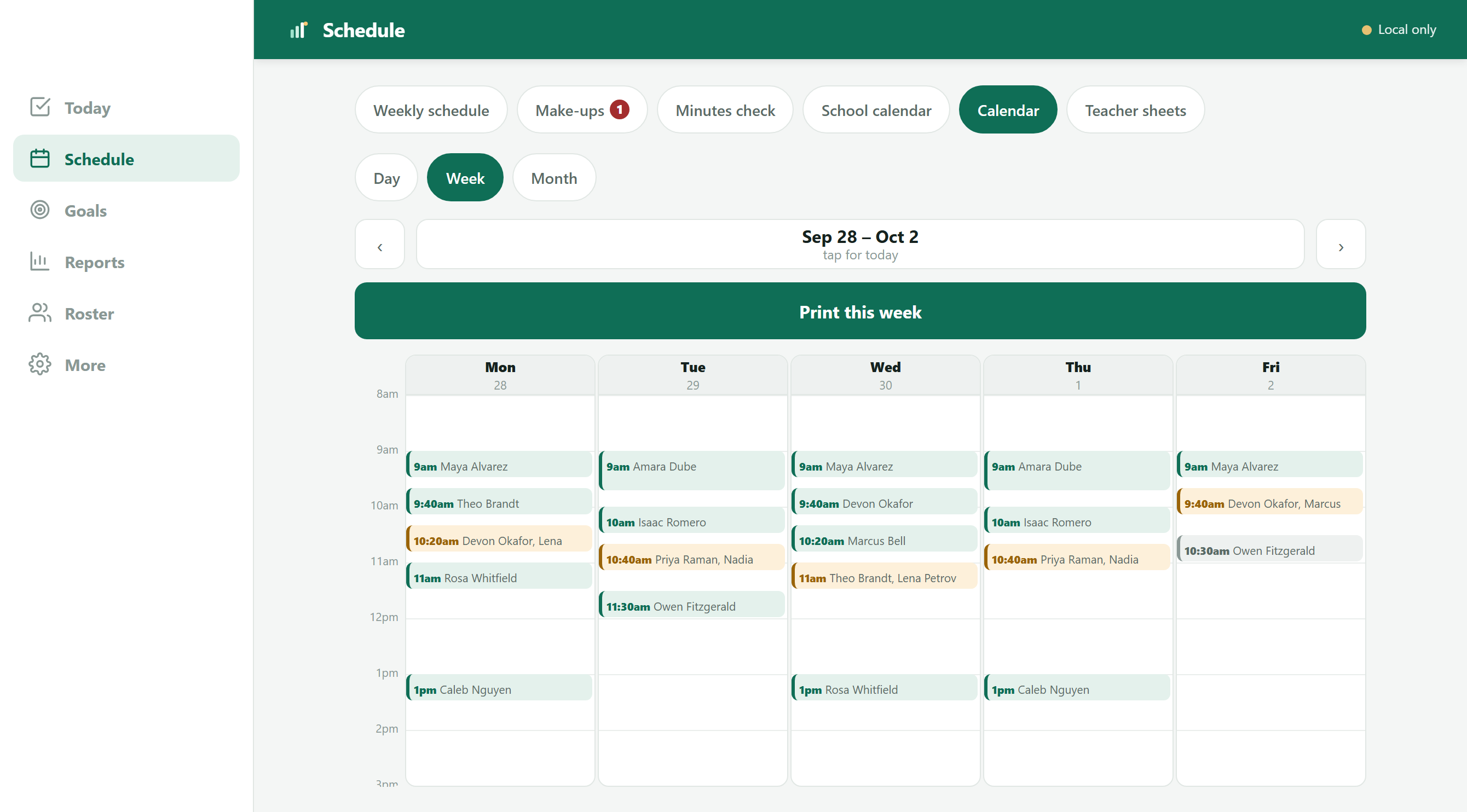
Day, week and month views built from the sessions you already scheduled — group sessions, push-in, consult, two buildings, the lot. Days off and moved sessions are already accounted for. Print it and pin it up.
Know before the month ends
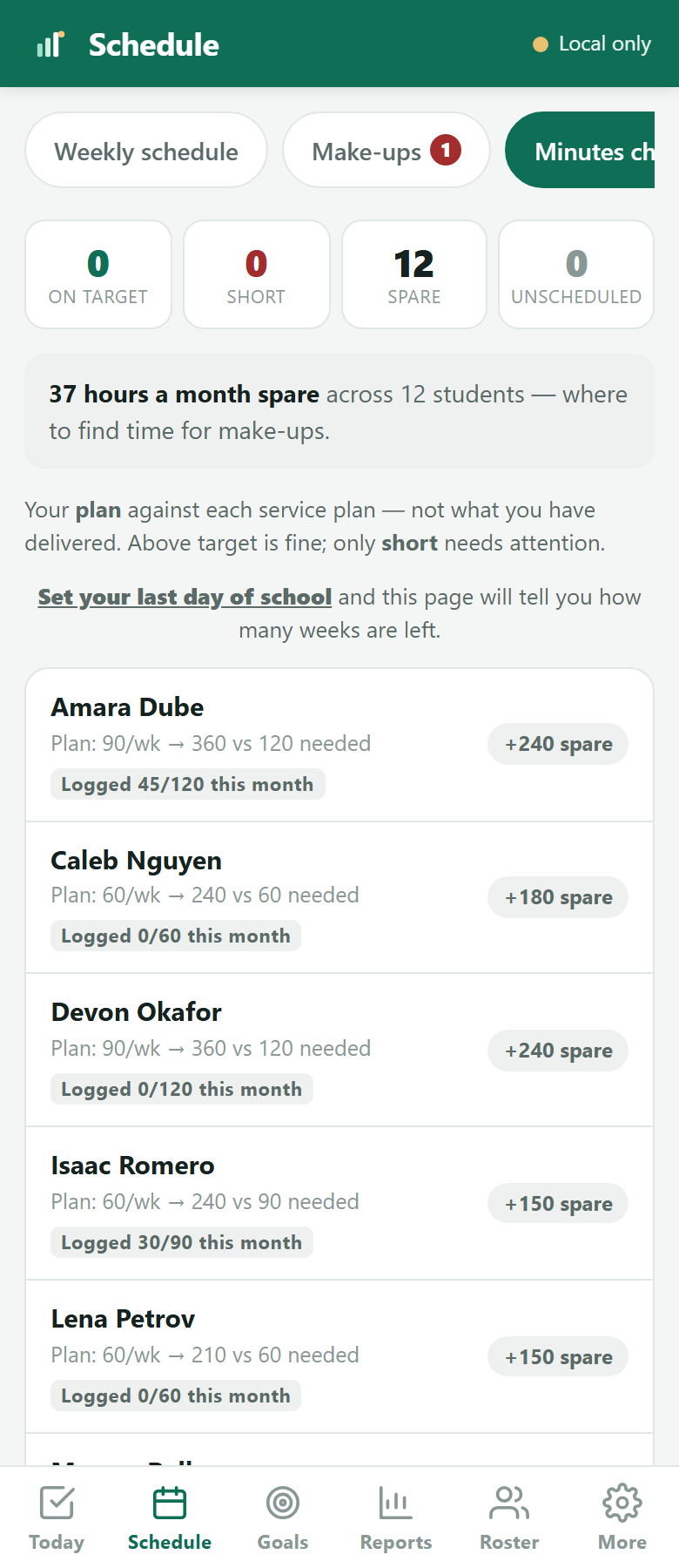
A 30-minute weekly slot against a 120-minute monthly target does not add up, and you usually work it out at the end of the month, when the time is already gone and the make-ups are stacking up. The minutes check counts the real school weeks in each window and shows you who your timetable leaves short while there is still month left to fix it.
Progress you can hand over
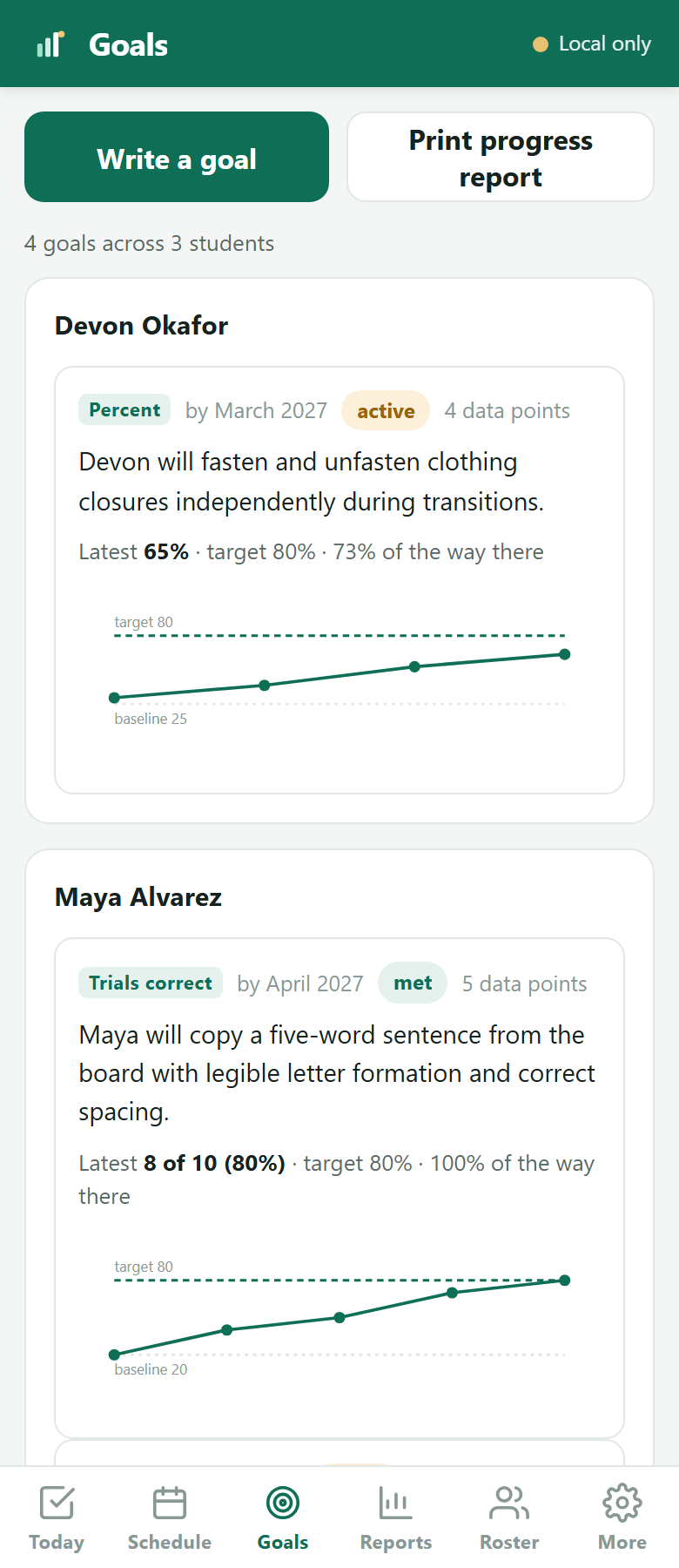
Write the goal as it reads in the plan, say what you are measuring, and record a number as you go. Trials correct, percent, a count, a rating scale. The graph draws itself and prints for the quarterly report.
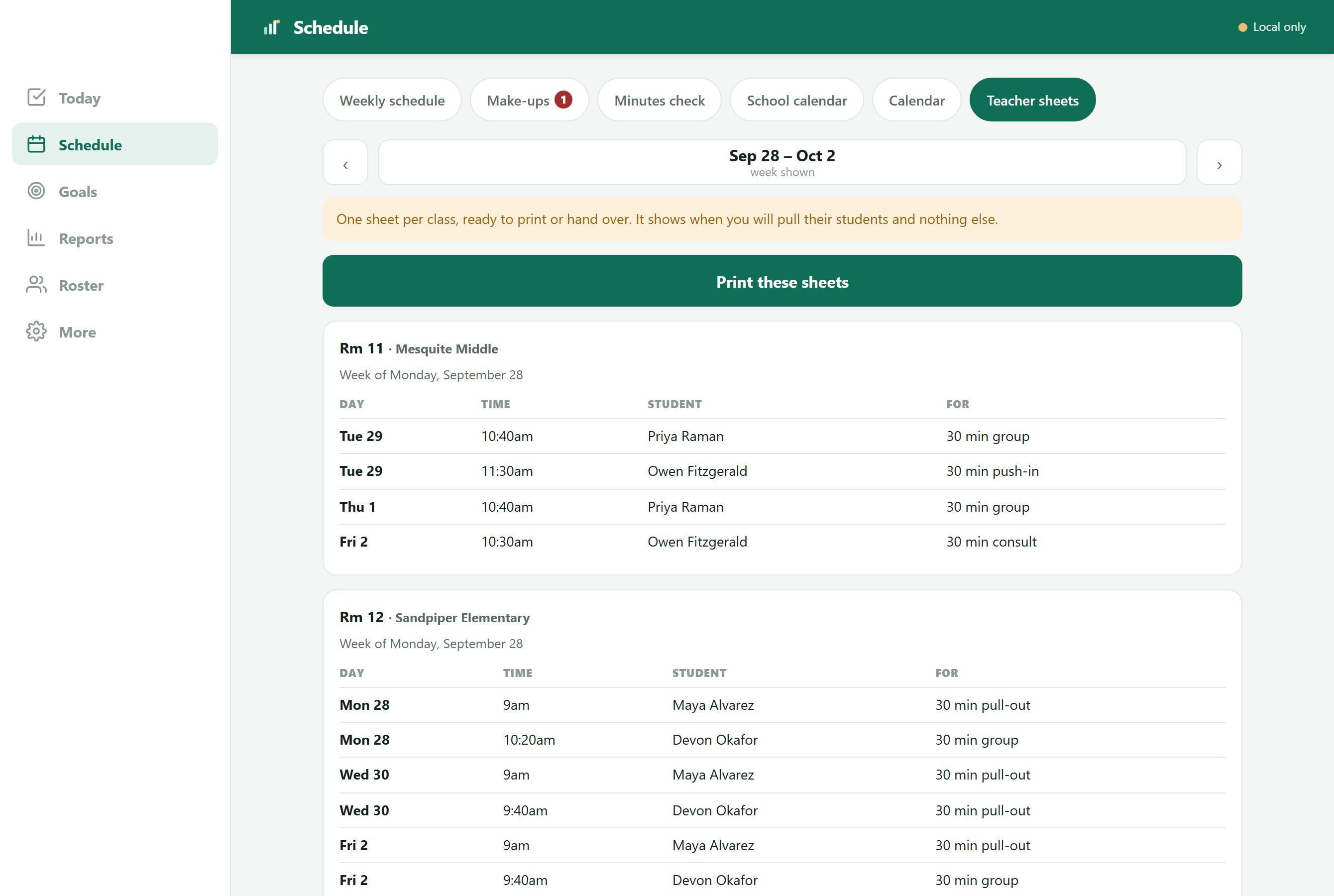
Teachers know when you're coming
One page per classroom with the day, time, student and session type. Teachers can plan around you, students are ready when you arrive, and nobody has to ask what your schedule is again. Each sheet covers that teacher's own students.
How it works
Import your roster, set each student's minutes and service type, build your week once, and paste in your district calendar so it knows your days off.
Open Today on your phone and mark each session as you go. It works offline and syncs when you're back online.
Check who is behind, see what is owed, pull a monthly report and watch each goal move toward its target.
Why MinutesMet exists
"I'm a school-based occupational therapist. I built MinutesMet because keeping track of service minutes and a schedule that changes every week was taking time I'd rather spend with students. Every feature comes from how school therapy actually works."IanFounder, school-based occupational therapist
Student privacy
You're trusted with children's education records. The software should take that as seriously as you do.
Every caseload is locked to the therapist who created it at the database level. No other account can see your students.
We don't sell data, show ads, or use student information for anything except running the app for you.
If you stop paying, your records stay readable and exportable. We'll never lock you out of students you're responsible for.
Pricing
Every account starts with 30 days of everything, free. After that, keep MinutesMet free for up to 10 students, or subscribe at the founding price while it is open.
For small caseloads, and for trying things out.
Students beyond 10 stay read-only. Limits can change with notice, as the Terms explain.
Start your free trialYour whole caseload, at a price locked for as long as you stay subscribed.
Paid plans renew automatically every month or year until you cancel. Prices don't include tax. Cancel online anytime.
Founding pricing is open for a limited time. When it closes, new subscribers will pay $19.99 a month or $149.99 a year — and anyone already subscribed keeps the founding price.
FAQ
You keep MinutesMet for free with up to 10 active students, with every feature included. If your caseload is bigger, subscribe to keep working with all of them. Students beyond the first 10 stay readable and exportable either way, so nothing is ever deleted or hidden.
No. You only enter payment details if you decide to subscribe.
While founding pricing is open, subscribing costs $9.99 a month or $79 a year, and that price stays the same for as long as your subscription stays active — even after the offer closes and new subscribers start paying $19.99 a month or $149.99 a year. There is no deadline announced in advance; it closes when it closes. If a founding member cancels and comes back later, they rejoin at the price available then.
Your account moves to the free plan. Your first 10 students keep working normally, and every other record stays readable and exportable. We don't lock therapists out of records they're responsible for.
It knows whichever ones you say count. Districts and states disagree about this — some owe make-ups when a student is absent, most don't, nearly all do when the therapist is out — so MinutesMet doesn't decide for you. You set the rule for each reason once, and it keeps a running total of what every student is owed, then shows you the lightest days in your week to fit those minutes back in.
That's handled. Sessions can sit on a rotating cycle — A/B days, a four-day week, a six-day cycle — and the rotation advances only on days school is actually open, so a snow day pushes it along instead of losing a turn. You can also schedule someone for the 1st and 3rd Monday, or the last Friday of the month, and cover more than one school.
No. It was built by one, but nothing in it is specific to occupational therapy. If you carry a caseload, owe minutes and answer for them, it fits — OT, PT and speech, including assistants, plus behaviour, counselling, social work, vision and hearing. The one thing it assumes is that somebody is counting your minutes.
Each caseload is locked to the account that created it, all traffic is encrypted, and we never sell data or show ads. Signing out removes the saved copy from that device, which matters on shared school computers. You can also turn on two-step sign-in, so a password alone doesn't open your caseload. Our security page has the details.
Yes. Use it on a phone, tablet or computer, and everything syncs between them. It also works without a connection and catches up once you're back online, which helps in buildings with patchy Wi-Fi.
Monthly plans can be canceled anytime from your account. The yearly plan costs less overall and covers the whole year, so there's nothing to manage when school lets out.
Email us at hello@minutesmet.com and we'll talk through team or district purchasing. If your technology office wants to know what happens to student data first, our full list of every student field we store is published, with the reason for each. If your district needs a data privacy agreement, email us and we'll work through it with you.